> For the complete documentation index, see [llms.txt](https://docs.lenses.io/latest/llms.txt). Markdown versions of documentation pages are available by appending `.md` to page URLs; this page is available as [Markdown](https://docs.lenses.io/latest/readme.md).
# Overview
{% hint style="info" %}
Release notes (What's new) is now in the [changelog ](https://docs.lenses.io/latest/changelog/)section.
{% endhint %}
## Agentic engineering for data streaming
Lenses is the developer experience and governance layer for engineers and AI agents.
## How Lenses works
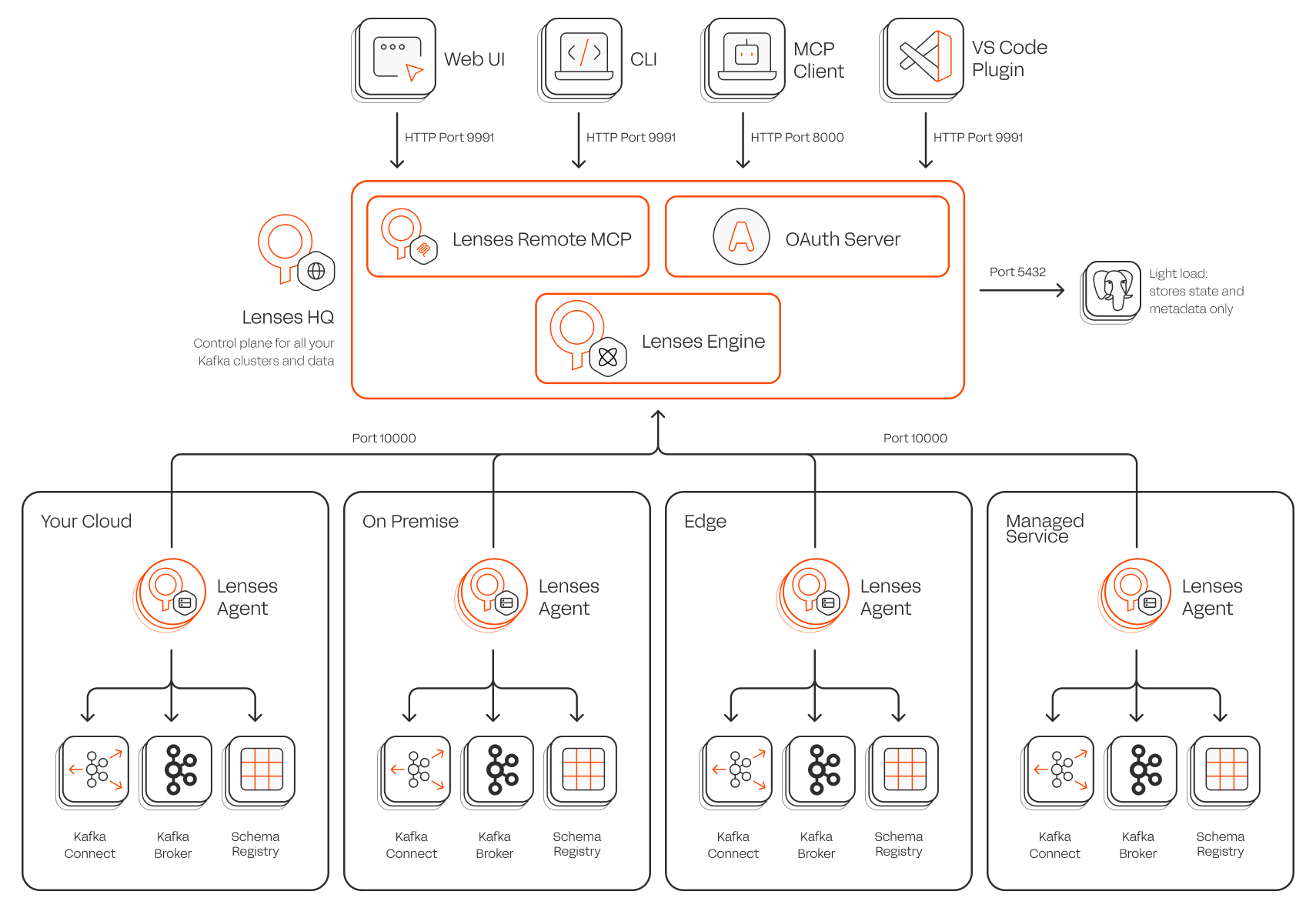
Lenses Architecture
Lenses has two components:
{% stepper %}
{% step %}
**HQ**
HQ is the control plane / central portal where end users interact with different environments (Kafka clusters). It provides a central place to explore data across many environments.
HQ is a single binary, installed on premise or in your cloud. From HQ you create environments which represent individual Kafka clusters and their supporting services. For each environment, you deploy an agent which connects to Kafka and back to HQ.
**Environments**
Lenses defines each Kafka Cluster and supporting services, such as Schema Registries and Kafka Connect Clusters, as an environment.
{% hint style="info" %}
You can have many environments, on premise, in the cloud, provided HQ has network access to the agent and the agent can connect to your Kafka cluster or any Kafka API compatible service.
{% endhint %}
Each environment has an agent. Environments can also be assigned extra metadata such as tiers, domains and descriptions.
{% endstep %}
{% step %}
**Agents**
{% hint style="info" %}
There's a 1 to 1 relationship between environments, agents and Kafka clusters.
{% endhint %}
To explore and operate in an environment you need an agent. Agents are headless applications, deployed with connectivity to your Kafka cluster and its supporting services.
Agents only ever communicate with HQ, using an Agent key over a secure channel. You can not, as a user, interact directly with them. End users are unaware of agents, only environments.
Agents require:
1. Agent Key to establish a communication channel to HQ
2. Connectivity to a Kafka cluster and credentials to do so.
The agents acts as a proxy to read, or write to your Kafka cluster, execute queries, monitor for alerts and manage SQL Processors and Kafka Connectors.
{% endstep %}
{% endstepper %}
---
# Agent Instructions
This documentation is published with GitBook. GitBook is the documentation platform designed so that both humans and AI agents can read, navigate, and reason over technical content effectively. Learn more at gitbook.com.
## Querying This Documentation
If you need additional information that is not directly available in this page, you can query the documentation by asking a question.
Perform an HTTP GET request on the following URL with the `ask` and `goal` query parameters:
```
GET https://docs.lenses.io/latest/readme.md?ask=&goal=
```
`ask` is the immediate question: it should be specific, self-contained, and written in natural language.
`goal` is what the user is ultimately trying to achieve, the reason they need the answer. Sharing it helps GitBook give you a better, more relevant answer. A goal is most helpful when it describes the outcome the user wants rather than restating the question. For example, with `ask=how do I create an API token`, a goal like `automate deployments from our CI pipeline` lets GitBook tailor the answer to that use case.
The response will contain a direct answer to the question and relevant excerpts and sources from the documentation.
Use this mechanism when the answer is not explicitly present in the current page, you need clarification or additional context, or you want to retrieve related documentation sections.